
AI Agents in NGAZE are automated tools that monitor your marketing, website, reputation, and customer data and take action by analyzing, alerting, or generating insights based on predefined rules.
They help handle repeatable tasks so you don’t have to monitor everything manually.
Where to Find AI Agents #
From the left navigation menu, click:
Menu → Agents
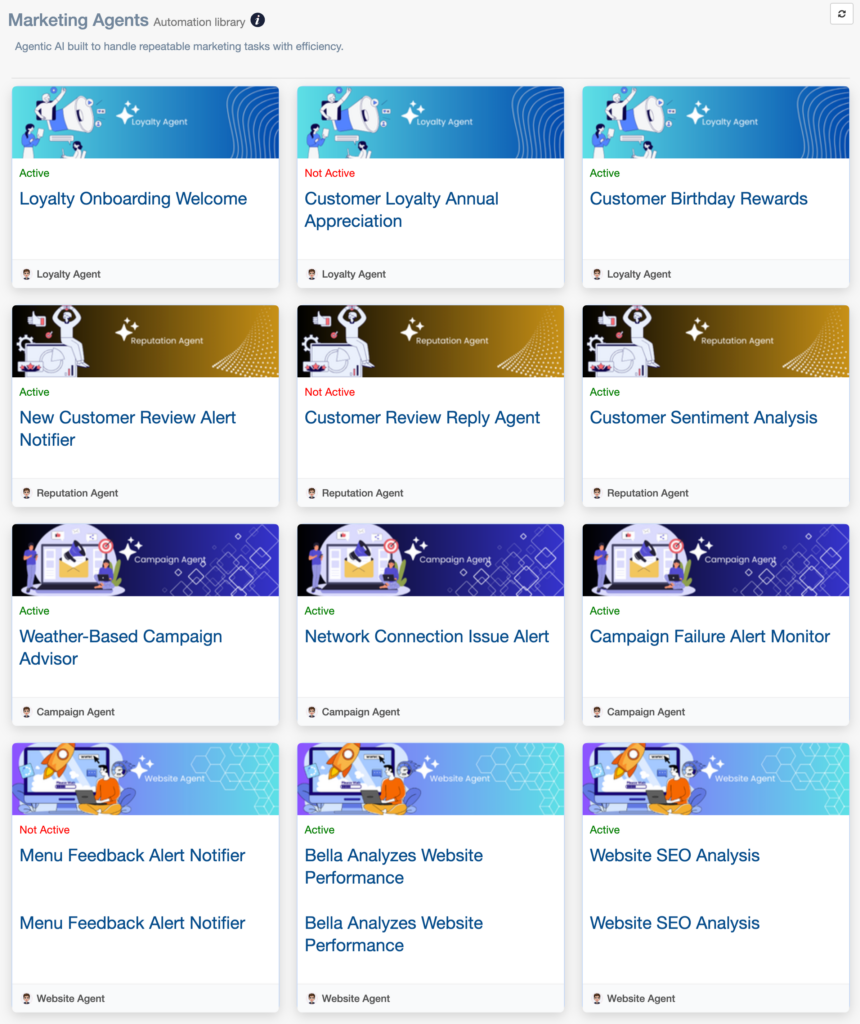
Simple Explanation #
Think of AI Agents as background monitors inside NGAZE.
They:
- Watch connected data sources
- Look for specific conditions or changes
- Trigger insights, alerts, or recommendations when needed
They do not replace human decision-making.
What AI Agents Do #
AI Agents can:
- Monitor reviews and customer sentiment
- Detect website performance or SEO issues
- Watch campaign health and failures
- Identify network or integration problems
- Analyze trends over time
- Trigger alerts when conditions are met
Some agents generate insights, others generate notifications, and some quietly monitor until action is needed.
What AI Agents Do NOT Do #
To avoid confusion, AI Agents:
- ❌ Do not automatically post content (unless explicitly configured)
- ❌ Do not change your website
- ❌ Do not reply to customers without setup
- ❌ Do not generate fake or estimated data
- ❌ Do not run without valid data
They act only on real, connected data.
Types of AI Agents in NGAZE #
AI Agents are grouped by function:
🤝 Loyalty Agents
Examples:
- Welcome or onboarding messages
- Birthday or anniversary reminders
- Customer appreciation workflows
⭐ Reputation Agents
Examples:
- New review alerts
- Review reply assistance
- Customer sentiment analysis
📣 Campaign Agents
Examples:
- Campaign failure alerts
- Network connection issue alerts
- Weather-based campaign insights
🌐 Website Agents
Examples:
- Website performance analysis
- SEO analysis
- Ongoing website monitoring
Active vs Not Active Agents
Each agent has a status:
✅ Active
- Required integrations are connected
- The agent is running on schedule
- Monitoring is enabled
⚠️ Not Active
- Required data or integrations are missing
- The agent has not been enabled
- There is not enough data yet
“Not Active” does not mean something is broken.
How AI Agents Are Triggered #
Agents run based on:
- Schedules (daily, weekly, periodic)
- Data changes (new reviews, errors, drops)
- Thresholds being crossed
- Event-based conditions
Not all agents trigger frequently.
Where AI Agent Output Appears #
Depending on the agent, output may appear in:
- Dashboards
- Alerts or notifications
- Reports
- Insights panels
Some agents only surface results when attention is required.
Why an AI Agent May Appear Quiet #
This is normal if:
- Conditions have not been met
- There are no issues detected
- Not enough new data is available
- The agent runs on a longer schedule
Silence often means everything is OK.
When to Use AI Agents #
AI Agents are most useful when you want to:
- Reduce manual monitoring
- Catch issues early
- Stay informed without constant checking
- Focus on decision-making instead of data gathering
When to Contact Support #
Contact support if:
- An agent remains inactive after all integrations are connected
- An agent was active and stopped unexpectedly
- No output appears after several days and conditions should have triggered
Need Help? #
If you need assistance:
- Use Help inside NGAZE
- Email support@support@thedigitalrestaurant.com
- Schedule a call with your account manager