
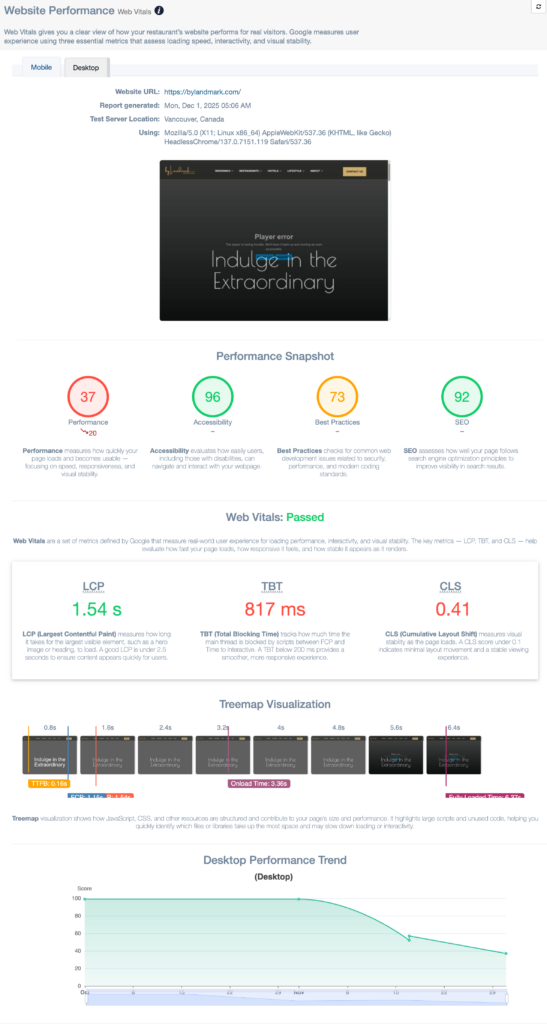
The Website Performance section shows how healthy your restaurant website is from a speed, usability, and SEO standpoint. It helps you quickly identify technical issues that may affect search rankings, user experience, and conversions.
This section is designed to answer:
“Is my website helping or hurting my marketing?”
Where to Find Website Performance #
You can access Website Performance in two places:
- Home → Website Performance card
- Insights → Website Performance
What Website Performance Measures #
NGAZE evaluates your website across five key areas:
⚡ Performance #
Measures how fast your website loads for users.
- Faster sites improve user experience
- Speed directly impacts Google rankings
- Slow sites increase bounce rates
♿ Accessibility #
Evaluates how accessible your website is for all users, including those using assistive technologies.
- Clear navigation
- Proper contrast and readability
- Accessible forms and buttons
Accessibility improvements also support SEO best practices.
✅ Best Practices #
Checks whether your site follows modern web standards.
This includes:
- Secure connections (HTTPS)
- Proper image usage
- Clean technical setup
🔍 SEO #
Measures how well your website is optimized for search engines.
This includes:
- Meta tags
- Page structure
- Indexing readiness
- SEO-friendly setup
This score reflects technical SEO, not keyword rankings.
📊 Web Vitals #
Tracks Google’s Core Web Vitals, which are official ranking signals.
Key metrics include:
- Loading performance
- Interactivity
- Visual stability
If you see “No data”, it usually means:
- Google Analytics or Search Console is not connected
- The site is new or recently launched
How Scores Are Displayed #
- Scores range from 0–100
- Color indicators help prioritize action:
- 🟢 Green = Good
- 🟠 Orange = Needs improvement
- 🔴 Red = Attention needed
Focus first on red and orange scores.
Where the Data Comes From #
Website Performance uses data from:
- Website scans
- Google performance metrics
- Connected analytics tools (when available)
Connecting Google Analytics and Google Search Console improves accuracy and depth.
How Often Website Performance Updates #
- Performance data updates periodically
- Some metrics update daily
- Core Web Vitals may take several days to populate
Improvements may not appear instantly after changes.
How to Use Website Performance Effectively #
- Review this section monthly
- Track trends rather than single scores
- Pair insights with Recommendations
- Address performance issues before running ads or campaigns
Common Questions #
Does NGAZE automatically fix website issues? #
No. NGAZE identifies issues and provides insights, but website changes must be implemented by you or your web team.
Why did my score change suddenly? #
Scores may change due to:
- Website updates
- Hosting changes
- Google metric updates
- New data availability
Is a perfect score required? #
No. Focus on improvement, not perfection. Consistent gains matter more than hitting 100.
Need Help? #
If you need assistance:
- Use Help inside NGAZE
- Email support@support@thedigitalrestaurant.com
- Schedule a call with your account manager