
Onboarding in NGAZE helps you set up your account, connect required networks, and activate features so data and automations can begin working correctly.
This article explains what onboarding includes, why each step matters, and what to expect after setup.
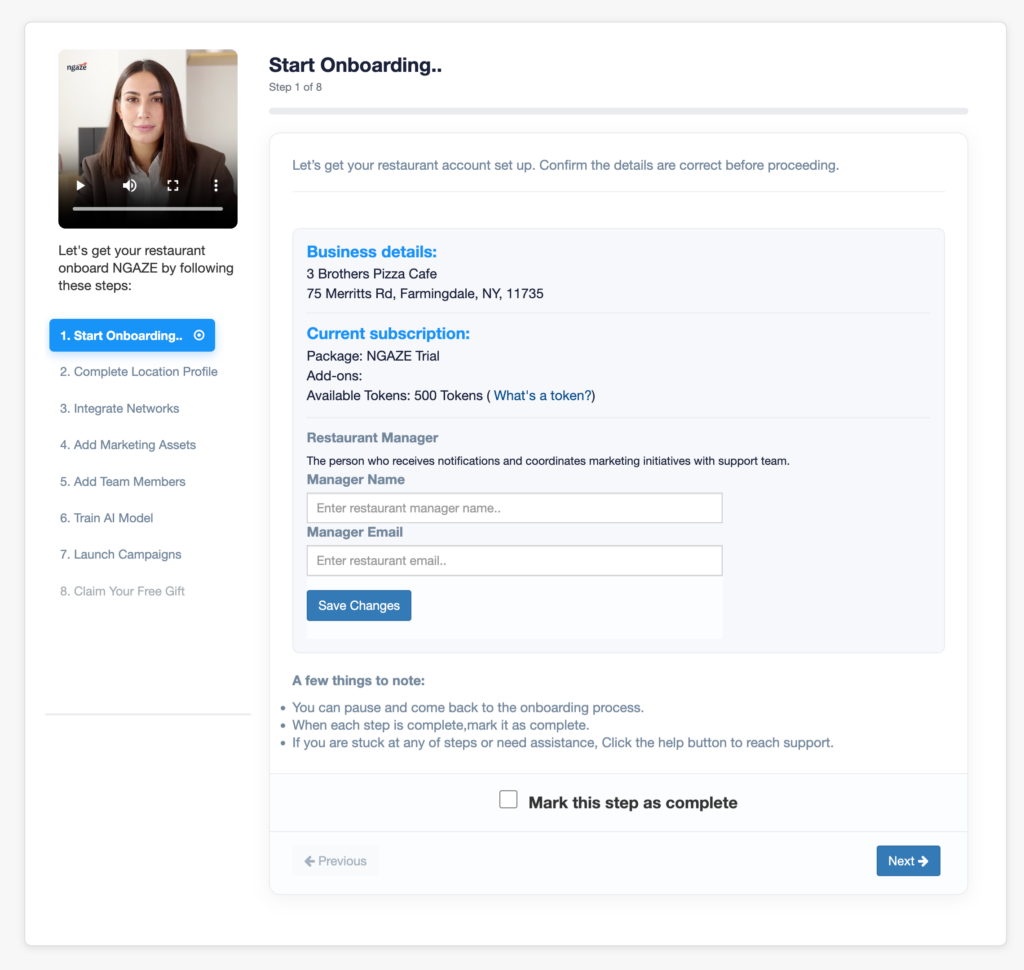
What Is NGAZE Onboarding? #
Onboarding is the process of:
- Setting up your NGAZE account
- Connecting data sources (Google, website, social, ads)
- Configuring locations and users
- Activating AI Agents and features
Completing onboarding ensures NGAZE can deliver accurate insights and automation.
Where Onboarding Happens #
Onboarding is completed:
- During your first login to NGAZE
- Through guided setup screens
- Via settings and integrations after signup
You can pause and return to onboarding at any time.
Key Onboarding Steps Explained #
1️⃣ Business & Location Setup
You’ll confirm:
- Business name
- Location(s)
- Website URL
- Time zone
This ensures data is attributed correctly.
2️⃣ Connect Your Website
You may:
- Install the NGAZE WordPress plugin
- Connect your website using an API key
This enables website performance, SEO, and audit features.
3️⃣ Connect Networks & Integrations
Depending on your plan, you may connect:
- Google Analytics
- Google Search Console
- Google Business Profile
- Ad platforms (Google Ads, Meta Ads)
- Social profiles
You can skip some and return later, but features will remain inactive until connected.
4️⃣ Upload Assets & Media (Optional)
You can upload:
- Logos
- Brand images
- Creative assets
These support creative and automation features.
5️⃣ Add Team Members
Invite users and assign roles so your team can access NGAZE.
6️⃣ Activate AI Agents & Automations
Enable AI Agents to:
- Monitor performance
- Watch reviews
- Analyze campaigns
- Trigger insights
Some agents require data before activation.
What Happens After Onboarding #
Once onboarding is complete:
- Data begins syncing (24–72 hours)
- Dashboards start populating
- AI Agents begin monitoring
- Reports become available over time
Not all features produce immediate results.
Common Onboarding Questions #
Do I need to complete every step?
No, but skipping steps may limit features until completed.
Can I change settings later?
Yes. All onboarding settings can be updated later.
Why don’t I see data yet?
Data requires time to sync after integrations are connected.
Can onboarding be done in phases?
Yes. Many users complete onboarding over multiple sessions.
When to Contact Support During Onboarding #
Contact support if:
- You’re stuck on a setup step
- An integration fails to connect
- You’re unsure which features to activate
- Data doesn’t appear after 72 hours
Need Help? #
If you need assistance:
- Use Help inside NGAZE
- Email support@support@thedigitalrestaurant.com
- Schedule a call with your account manager