
Promotional Offers help you highlight specials, discounts, and limited-time promotions in a structured way so they can be tracked, referenced, and used across your marketing efforts.
This feature answers:
“What offers are we running, and how are they being used in marketing?”
Where to Find Promotional Offers #
You can access Promotional Offers in two places:
- Home → Promotional Offers section
- Modules → Offers
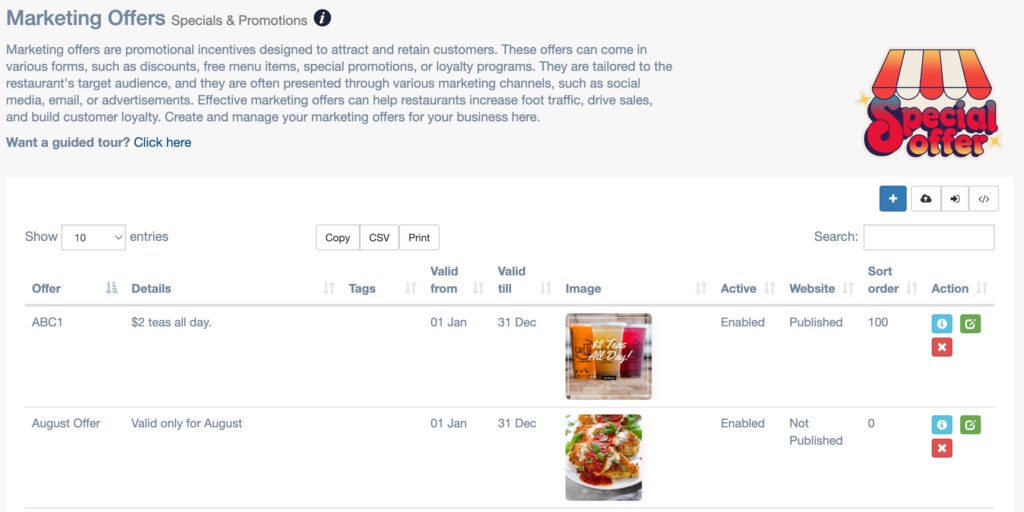
What Promotional Offers Are Used For #
Offers are designed to support:
- Seasonal promotions
- Limited-time specials
- Happy hour or weekday deals
- Event-based offers
- New menu item launches
They give your marketing clear talking points and consistency across channels.
What You’ll See in Promotional Offers #
Each offer may include:
- Offer name or title
- Description of the promotion
- Active or upcoming status
- Associated marketing activity
This makes it easy to understand what’s currently being promoted.
How Offers Are Used Across NGAZE #
Promotional Offers can be referenced in:
- Marketing Playbook activities
- Social media scheduling
- Campaign planning
- Recommendations
This ensures promotions are intentional and aligned, not forgotten.
How to Use Promotional Offers Effectively #
- Create offers before launching campaigns
- Keep offer descriptions simple and clear
- Align offers with seasonality and demand
- Avoid running too many offers at once
Offers work best when paired with consistent promotion.
Common Questions #
Do offers automatically publish anywhere? #
No. Offers are tracked and referenced inside NGAZE, but promotion must be scheduled or executed through campaigns or social tools.
Can I edit or end an offer? #
Yes. Offers can be updated or deactivated as promotions change.
Are offers required? #
No, but restaurants using clear offers often see better engagement and response.
Best Practices #
- Use offers sparingly for higher impact
- Tie offers to specific goals (traffic, orders, events)
- Review offer performance during reporting reviews
- Retire outdated offers promptly
Need Help? #
If you need assistance:
- Use Help inside NGAZE
- Email support@support@thedigitalrestaurant.com
- Schedule a call with your account manager